In Applixure Workflow, the normal operation for the system is to send email notifications to the users assigned to various roles in the Workflow’s board when something of note happens; notification for the person having been assigned as a worker for the new work item, notification for people in board’s owner role for new work item being created into it, and so on.
However, these emails are necessarily associated with the actual user accounts assigned to a particular Workflow board and sometimes, a need may arise for being able to receive such notifications using arbitrary email addresses as recipients or to customize the actual contents of the email itself.
One such example could, for instance, be a separate technical system that has a so-called inbox address that it monitors and then can parse any incoming emails for structured data and start a pre-defined process based on it.
To make these scenarios possible, Applixure Workflow has recently introduced an ability to add custom emails in the board’s settings, allowing our customers to specify completely custom-bodied emails with freely defined recipient email-address.
These emails are each associated with a specific event that may happen as part of Workflow’s work items operations, such as when a new work item is created or when its associated devices change.
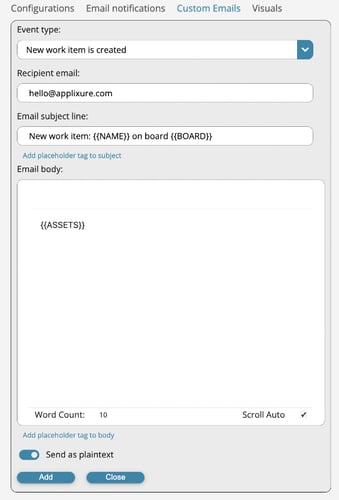
Custom emails are accessible from the Workflow board’s settings, where new custom emails can be created or already existing ones are managed.
For emails, in both the subject line and body itself, it is possible to mix static text as well as utilize placeholder tags that the system will dynamically replace at the send time with appropriate values from the work item the emailing is associated with.
Examples of such dynamic content would be a list of the assets/devices that are currently active for the work item or current assignees for the work item. This makes it easy to construct emails in the expected structure, layout and required content that the receiving system can then parse if they are to be used in automatic – or machine-to-machine communication – context instead of being sent to a natural person.
In the future, Applixure also plans on adding facilities for initiating similar kinds of notifications using outbound API calls from Workflow system that would enable even more advanced integration capabilities between the Workflow product and our customers’ own cloud-based systems, such as device management systems.
For more information about Applixure Workflow:
Visit our Workflow product page >>